


Defalto CRM 1.8 Released
Two Factor Authentication and Reports for Defalto CRM
Defalto CRM 1.8 introduces two major improvements: Two Factor Authentication for stronger login protection and Reports for Defalto CRM with grouping, calculations, charts and PDF output.
Main highlights in Defalto CRM 1.8
Version 1.8 focuses on security, reporting, better module delivery and smoother daily CRM work.
Two Factor Authentication
2FA adds a second verification step after the password and improves login protection for CRM users.
Reports for Defalto CRM
Reports now support grouping, calculations, charts and PDF report output for better CRM analysis.
Installer module delivery
The Installer was improved for version checks and license based module installation.
Two Factor Authentication for Defalto CRM
The main security improvement in Defalto CRM 1.8 is Two Factor Authentication. It adds a second verification step after password login and helps protect CRM accounts from unauthorized access.
Safer login process
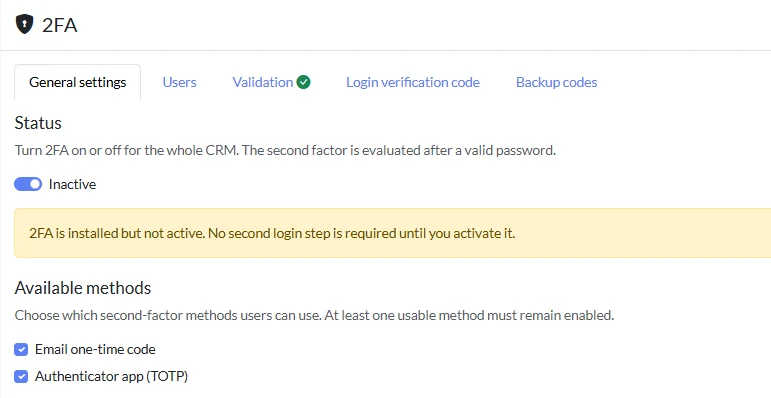
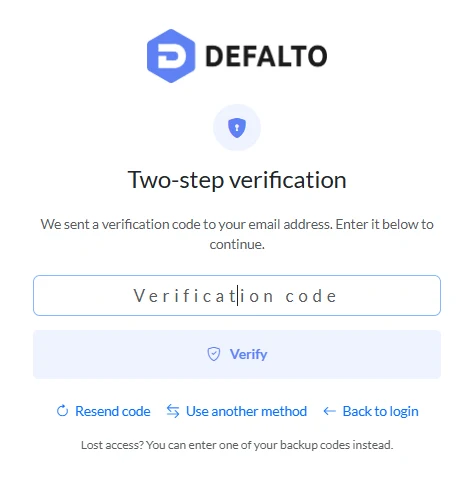
Defalto CRM 1.8 prepares 2FA as a core security feature. Users can verify login with an email code or a TOTP authenticator app, depending on the enabled configuration.
- Email verification code method
- TOTP authenticator app method
- Backup code handling during login
- Improved activation and deactivation flow
- Switching between email and TOTP methods
- Defalto styled login challenge screen
Better 2FA management
The 2FA Settings area was refined with better spacing, tabs, buttons and safer reset modes. The module structure was also improved for long term maintainability.
- Improved 2FA Settings screens
- Included email templates for verification and backup codes
- Better SMTP fallback and timeout handling
- Dedicated models for 2FA database tables
- Atomic backup code usage checks
- Atomic TOTP step reuse protection
Reports for Defalto CRM
The second main feature in Defalto CRM 1.8 is improved reporting. Reports now support grouped records, calculations, charts and PDF output, helping teams understand CRM data more clearly.
Grouped reports and calculations
Users can group report data by selected CRM fields and display calculated values for each group and for the whole report.
- Separated Grouping tab
- Multiple grouping levels
- Group level sum, average and count
- Global report calculations
- Expandable and hideable report groups
- Improved report table design
Charts in detail and PDF output
Reports can now include charts in the report detail and PDF output. This makes business data easier to read, present and share.
- Separated Charts tab
- Charts in report detail view
- Charts in PDF reports
- Report name, description and filters in PDF
- Horizontal scrolling for wider reports
- Configurable column widths
More improvements in Defalto CRM 1.8
Beside 2FA and Reports, this release improves Installer behavior, Quick Create, workflow calculations and prerelease polish.
Installer improvements
Installer version checking and license handling were improved for better module delivery.
Quick Create sequence
Quick Create field ordering was improved after saving fields through Layout Editor.
Quick Create popup fix
Reference select popup behavior was corrected so it no longer appears behind other modal elements.
Workflow calculations
Workflow based calculation behavior was reviewed and fixed for better automated CRM logic.
Prerelease fixes
Opportunity fields, translations, summary wrapping and currency label display were corrected before release.
Softer active field highlight
The active form cell highlight was refined to be less distracting while keeping forms clear.
Why Defalto CRM 1.8 matters
Defalto CRM 1.8 improves two core areas of a business CRM system: security and reporting. Companies need safer access to customer data and clearer insight into business performance.
- Two Factor Authentication improves CRM login protection
- Backup codes provide safer access recovery during 2FA login
- Reports help managers analyze grouped business data
- Charts make CRM data easier to understand and share
- PDF reporting improves presentation and documentation
- Installer and Quick Create fixes improve everyday administration
Defalto CRM for open source and small business teams
Defalto CRM is built for companies that need practical customer management, better control over their CRM system and a path to grow with Membership and extensions.
Open Source CRM
Learn more about Defalto CRM as an open source CRM option for companies that want flexibility and control.
Open Source CRMFree CRM for Small Business
See how Defalto CRM can help small businesses manage customers, sales, support and everyday communication.
Free CRM for Small BusinessFree Trial
Try Defalto CRM with hosted setup and test the system before choosing your final CRM plan.
Start Free TrialMembership and extensions
Defalto CRM can be extended with Membership and optional extensions depending on your business needs.
Defalto Membership
Membership helps keep Defalto CRM updated and supported. It can also provide access to Membership based benefits and AI related features depending on the selected setup.
- Regular updates and support
- Access to Membership benefits
- Better long term CRM maintenance
- Support for growing Defalto CRM installations
Defalto extensions
Defalto extensions add more functionality for documents, automation, reporting, security, customer processes and other business needs.
- Add selected CRM extensions
- Improve business workflows
- Extend documents and automation
- Choose extensions based on your needs
Try Defalto CRM and test the new improvements
Start with a free hosted trial and see how Defalto CRM can help your team manage customers, secure access, analyze reports and improve daily CRM work.
Start Free TrialFrequently asked questions
Answers about Defalto CRM 1.8, Two Factor Authentication, reports and CRM improvements.
What is new in Defalto CRM 1.8?
Defalto CRM 1.8 adds Two Factor Authentication and improved Reports for Defalto CRM. It also improves Installer license handling, Quick Create behavior, workflow calculations and prerelease usability issues.
Does Defalto CRM 1.8 include 2FA?
Yes. Defalto CRM 1.8 prepares Two Factor Authentication with email verification, TOTP authenticator app support, backup codes and improved Settings screens.
What are Reports for Defalto CRM?
Reports for Defalto CRM help users analyze CRM data. Version 1.8 adds grouping, calculations, charts, PDF output and better report layout.
Can reports be grouped?
Yes. Defalto CRM 1.8 supports grouped reports, including multiple grouping levels.
Can reports include charts?
Yes. Charts can be shown in report detail and also included in PDF output.
Does Defalto CRM 1.8 improve security?
Yes. The main security improvement is Two Factor Authentication, which adds a second verification step after password login.